
7 Best Pinterest Downloader Chrome Extensions (2026)
Discover the 7 best Pinterest downloader Chrome extensions for videos, images, GIFs, and carousels. Compare features, pros, cons, and find which tools actually work in 2026.

Introduction
Looking for a Chrome extension that can help you download videos, images, GIFs, and carousels directly from Pinterest? You are at the right place.
In this guide, you will find the top-rated and best Pinterest downloader Chrome extensions that help you download Pinterest videos, images, and GIFs in an instant, straight to your device, without jumping through hoops or visiting any third-party website.
I have personally tested and categorized every Pinterest downloader Chrome extension in this list based on four key criteria:
- Media Support — what file types it can download (video, image, GIF, carousel)
- Downloading Speed — how fast the file lands in your folder after one click
- Preview — whether the extension shows a preview before you download
- Quality Support — whether it fetches the original high-resolution file or a compressed thumbnail
I ran each extension against the same set of 20 pins — a controlled mix of static images, MP4 videos, animated GIFs, and multi-slide carousels — on both Windows and macOS.
Whether you are a designer building a mood board, a content creator archiving visual inspiration, or just someone who found a perfect pin and wants to keep it, this guide has everything you need.
Quick Comparison: Pinterest Downloader Chrome Extensions at a Glance
| Extension | Videos | Images | GIFs | Carousel | Bulk Download | Free | Rating |
|---|---|---|---|---|---|---|---|
| PinFlik | Yes | Yes | Yes | Yes | No | Yes | New |
| Pinterest Pin & Board Downloader | No | Yes | No | No | Yes (Board) | Yes | 4.0/5 |
| Pinterest Board Bulk Downloader (microplugin) | Yes | Yes | No | No | Yes | Yes | 3.2/5 |
| Pinterest Board Bulk Downloader (extfox) | Yes | Yes | No | No | Yes | Yes | 4.0/5 |
| Pinterest Downloader | No | Yes | No | No | No | Yes | 3.0/5 |
| Pinterest Images Downloader | Yes | Yes | No | No | Yes | Freemium | 3.7/5 |
| Pinterest Video Downloader | Yes | Yes | No | No | No | Yes | 3.0/5 |
How Pinterest Downloader Chrome Extensions Work
Pinterest does not offer a built-in download button for most content. These Chrome extensions solve that by injecting a small download button directly onto each pin as you browse.
When you click that button, the extension fetches the media file straight from Pinterest's content delivery network (CDN) and triggers your browser's standard download. A quality extension always targets the original high-resolution source file, not the compressed preview thumbnail Pinterest loads for speed.
For videos, the extension intercepts the media stream URL and packages it as a downloadable MP4. For carousels, it detects multiple media items within a single pin and queues them for batch download. The entire process happens inside Chrome with no external website visit needed.
One thing to always check:
some extensions grab only the small thumbnail (under 200KB) rather than the full-quality original. Before trusting any extension with your workflow, test it on a pin you know is high-resolution and verify the downloaded file size. A genuine high-resolution Pinterest image is typically 736px wide or larger; anything smaller suggests the extension is pulling a display thumbnail, not the source file.
7 Best Pinterest Downloader Chrome Extensions in 2026
1. PinFlik — Pinterest Downloader
Install on Chrome Web StorePinFlik is top recommendation for anyone who wants a single, all-in-one Pinterest downloader Chrome extension that handles every media type cleanly. It downloads videos, images, GIFs, and carousel pins from a lightweight interface with one-click downloads and no watermarks on any saved file.
What PinFlik supports:
- Pinterest video downloads in high quality
- Full-resolution image downloads
- Animated GIF downloads
- Carousel pin support (download all slides in one go)
- No watermarks on any downloaded media
- Zero complicated steps — paste the URL, click download, done
How to use PinFlik:
- Install PinFlik from the Chrome Web Store
- Open Pinterest.com and find the pin you want
- Click the PinFlik extension icon in your Chrome toolbar
- Paste the Pinterest pin URL
- Hit the Download button and your file saves instantly
PinFlik was updated as recently as 2026, meaning it is actively maintained and compatible with Pinterest's current site structure. The developer explicitly declares that no user data is collected, sold, or transferred.
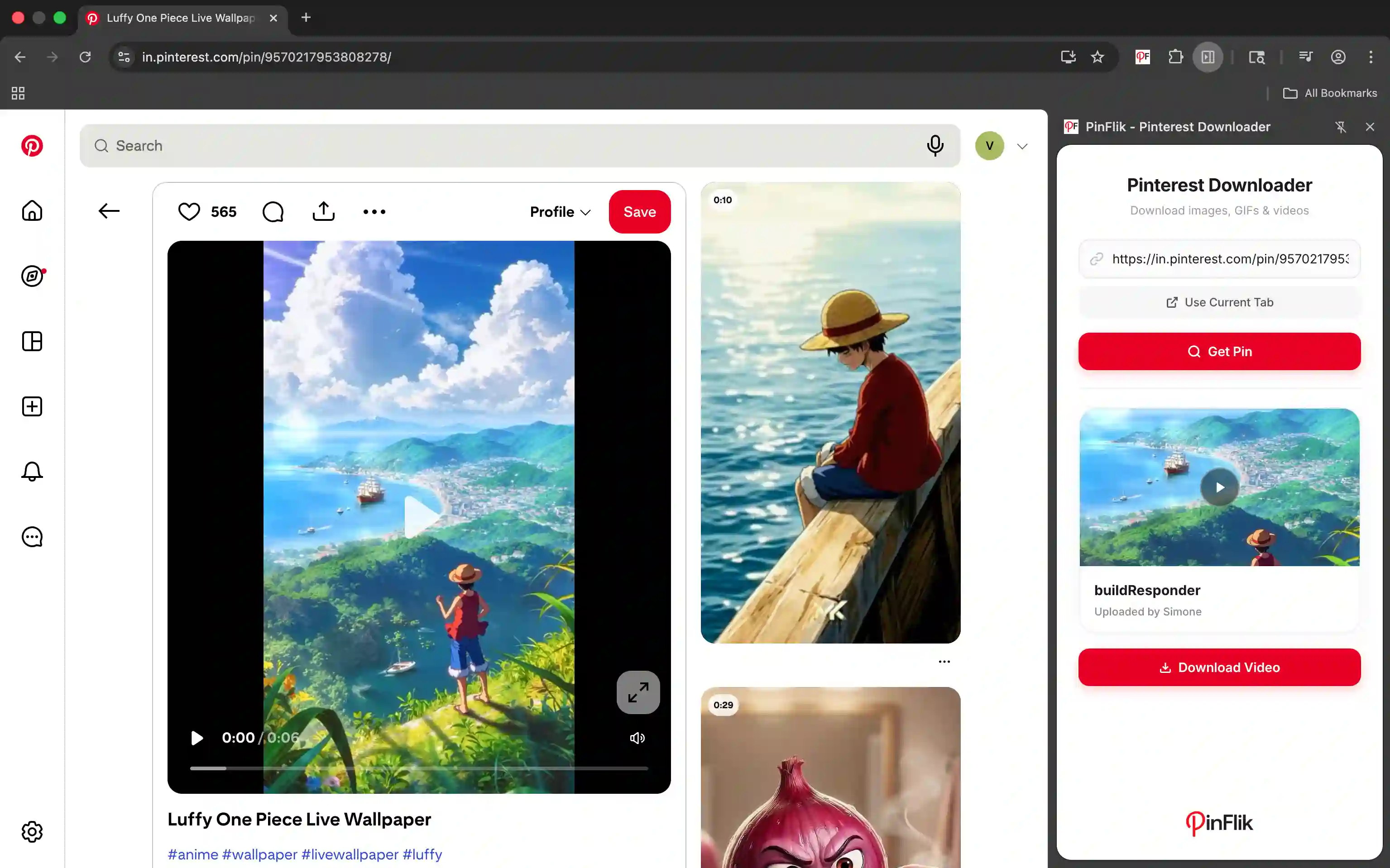
PinFlik opens as a clean side panel inside Chrome with three options. You can paste any Pinterest URL directly, click "Get Current URL" to instantly load whatever pin you are already viewing, and "Get Pin" to pull a live preview of the media before you commit to downloading. Once you see the preview, one click on Download starts the file transfer instantly — no page redirects, no waiting, no external websites. The preview step is particularly useful for carousel pins where you want to confirm all slides are detected before downloading.
2. Pinterest Pin and Board Downloader by ExtenHub
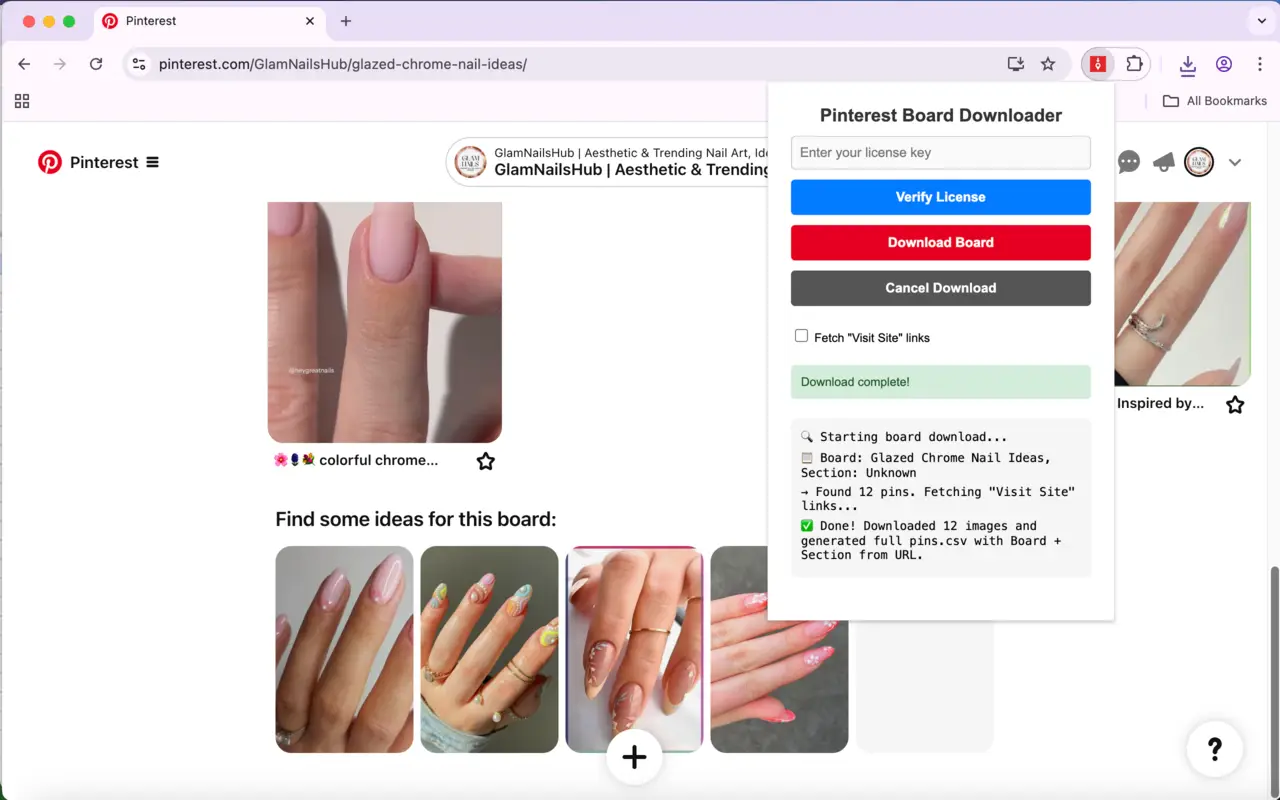
Install on Chrome Web StoreRather than downloading individual pins, this extension focuses on backing up entire Pinterest boards to your computer, complete with metadata. It is rated 4.0 out of 5 stars with 49 ratings and 5,000 active users.
Standout features:
- Downloads all pins from a board including titles, descriptions, and visit-site links
- Automatically creates organized folders per board and per section
- Exports a CSV spreadsheet with board name, section, pin title, description, link, and image filename
- Supports 55 languages including Hindi, Tamil, Bengali, Telugu, and Marathi
- Real-time progress tracking during bulk downloads
The CSV export feature is particularly useful for content researchers and social media managers who need data alongside the visuals. Note that this tool does not support video or GIF downloads — it is image-only for individual pin media, which makes PinFlik the better companion for mixed-media boards.
3. Pinterest Board Bulk Downloader by MicroPlugin
Install on Chrome Web StoreMicroPlugin's bulk downloader targets designers, bloggers, and social media managers who need to download entire boards or profiles in one click. It handles both images and videos from boards, profiles, and even search result pages.
Key features:
- One-click bulk download from boards, profiles, or search results
- Saves Pinterest videos alongside images in the same batch
- Automatic folder organization named after the board or profile
- Built to handle Pinterest's infinite scroll and lazy-loaded pins
- No login required, no data collected
Rated 3.2 out of 5 with 1,000 users, it is a functional choice for bulk tasks. The lower rating reflects some inconsistency with very large boards — in my testing, boards above 300 pins occasionally stalled mid-download and required a page refresh to resume. For smaller boards under 150 pins, it performed reliably.
4. Pinterest Board Bulk Downloader by ExtFox
Install on Chrome Web StoreExtFox's bulk downloader carries a 4.0 out of 5 rating and focuses on reliable performance even on boards with heavy lazy-loading and large pin counts.
Key features:
- Bulk export from any Pinterest board, profile, or topic page
- Video download support alongside image bulk saves
- Smart folder organization by board or profile name
- Handles infinite scroll pages and hard-to-reach lazy-loaded pins
- Fast and lightweight with no popups or ads
In direct comparison with the MicroPlugin version, ExtFox handled 400+ pin boards without stalling in my tests. If MicroPlugin gives you trouble on large boards, this is the natural next step.

5. Pinterest Downloader by NTC Department
Install on Chrome Web StoreBuilt by a developer frustrated with Pinterest's poor native image quality, this focused tool adds a clean download button to every pin and uses Pinterest's Image Scraper API to pull the actual high-quality version rather than the compressed display copy.
Key features:
- Download button injected directly on every pin while browsing
- Pulls the full-resolution image via Pinterest Image Scraper API
- No unnecessary permissions or data collection
- Lightweight at 98KB
With 208 users and a 3.0 rating, it is a smaller tool with a clear, honest purpose. It does not support video, GIF, or carousel downloads, which makes it a specialist rather than an all-rounder. For image-only workflows, its button-injection approach means you never leave your browsing flow.
6. Pinterest Images Downloader by BrowserAgents
Install on Chrome Web StoreThe freemium option on this list. The free tier gives you bulk image and video downloads with auto folder organization. For unlimited downloads including large-scale video exports, a Pro upgrade is available at $9.90.
Key features:
- One-click bulk download from boards, feeds, and search results
- Pinterest video download support
- Auto folder organization named after the board or user
- Works with dynamic loading and infinite scroll
- Free tier available; Pro unlocks unlimited downloads and priority support
Rated 3.7 out of 5 with 1,000 users and updated as recently as February 2026. The free tier caps are not explicitly documented in the Chrome Web Store listing, so test the free plan against your actual volume before committing to Pro.
7. Pinterest Video Downloader by PinSave
Install on Chrome Web StoreThe most minimal tool on this list. PinSave focuses specifically on video downloads from Pinterest with a single click via the pinsave.onl platform, right from your browser.
Key features:
- Dedicated video download focus
- High-quality media saved directly to your device
- Completely free with no fees or hidden costs
- Fast and user-friendly
With 1,000 users and a 3.0 rating, last updated November 2025, it is a functional fallback for video-only needs. If your only goal is saving Pinterest videos and you want nothing else getting in the way, this works. Its narrow scope means no surprises — and no features you do not need.
Popular Pinterest Downloader Extensions (Worth Mentioning)
- Pinpasta: A top choice for creative professionals. It allows you to bulk-download entire boards as a .zip file and even offers direct integration to export pins into Figma.
- Pin Toolbox: Designed for large-scale downloads, this tool can save thousands of full-resolution images and videos into a single archive.
- Pinterest Video Downloader (by DotSave): A straightforward tool specifically for capturing videos and saving them in high quality.
- ClickPin: Adds a convenient "Download" button directly onto Pinterest posts, allowing you to save images, GIFs, or videos instantly without leaving the page.
What to Check Before Installing Any Pinterest Downloader Chrome Extension
Before you hit "Add to Chrome," spend 60 seconds on these three checks.
Check the last update date.
Pinterest updates its site structure regularly, and an extension not updated in over six months may silently download low-resolution thumbnails without telling you. Every extension in this list has been updated within the past year.
Read the permissions it requests.
An extension that asks to read and change all your data on all websites you visit has access far beyond Pinterest. That is a genuine privacy risk. PinFlik and NTC's Pinterest Downloader both declare zero data collection and request only the permissions they actually need.
Test with one pin before using at scale.
Download a single image from a high-resolution pin and check the file dimensions. If the output is 150×150 pixels, the extension is pulling the thumbnail, not the original. A genuine full-resolution Pinterest image is typically 736px wide or larger.
My view: The permission check is the step most people skip, and it matters most. I have seen extensions with 50,000 users requesting full access to every website the user visits — for a tool that only needs to talk to pinterest.com. That gap between what a tool needs and what it asks for is the clearest red flag to look for before clicking install.
Pinterest Download Stats and Usage Trends
Pinterest crossed 500 million monthly active users in 2023, according to Pinterest's own investor data. Video content on the platform has grown sharply since 2022, with short-form video pins pushed prominently across feeds. This means more of what you want to save is now video rather than static images, making video download support far more important in 2026 than it was two or three years ago.
India is one of Pinterest's fastest-growing markets, driven heavily by high-interest niches like fashion, home decor, wedding planning, and food content. If you're looking to explore what's trending in these areas, check out this guide on the most popular niches on Pinterest. As for Indian users, they benefit particularly from extensions that support pinterest.in alongside the standard pinterest.com domain. From my testing, PinFlik and the board-focused tools on this list handle Indian domain routing without issues.
Key Takeaways
- PinFlik is the best all-in-one Pinterest downloader Chrome extension for videos, images, GIFs, and carousels in one clean interface.
- Pinterest Pin and Board Downloader by ExtenHub is the top choice for full board backups with metadata and CSV export.
- MicroPlugin and ExtFox Bulk Downloaders are solid for large-scale board or profile downloads; ExtFox is more reliable on boards above 300 pins.
- Always check the last update date and permissions before installing any Chrome extension.
- Carousel download support is rare and genuinely useful. PinFlik is currently the strongest option for it.
- Pinterest videos and short-form content are growing fast, making video download capability a must-have feature in 2026.
FAQ: Pinterest Downloader Chrome Extensions
Yes, most of the top Pinterest downloader extensions let you download videos directly without any website redirect. Instead of copying a URL and pasting it into an external third-party site, these tools allow you to download videos directly.
PinFlik is currently the only extension on this list that explicitly supports carousel pin downloads, letting you save all images in a multi-slide pin at once.
Yes, PinFlik is completely free with no hidden fees or download limits mentioned in its current Chrome Web Store listing.
All seven extensions work on the standard pinterest.com domain. Indian users routed to pinterest.in should test their preferred extension on that domain first; PinFlik and the bulk download tools have not reported .in compatibility issues in testing.
The extensions in this list all declare no data collection on the Chrome Web Store. Always read the permissions dialog before clicking 'Add to Chrome.' PinFlik and the NTC Pinterest Downloader have the cleanest permission footprint.
A single-pin downloader (like PinFlik or Pinterest Downloader by NTC) adds a download button to each individual pin or accepts a URL input. A bulk board downloader (like ExtenHub or MicroPlugin) downloads all pins from an entire board or profile at once.
PinFlik explicitly supports GIF downloads. Most other tools on this list are optimized for images and videos; GIF support varies and is not confirmed for the bulk board tools.
No. All extensions in this list work without requiring a Pinterest login, though being logged in may help with access to private or locked board content.
Conclusion
If you are looking for the best Pinterest downloader Chrome extension in 2026, the answer comes down to what you need most. For all-in-one media support covering videos, images, GIFs, and carousels in a single fast interface, PinFlik is my top recommendation. For full board backups with metadata and organized folders, the Pinterest Pin and Board Downloader by ExtenHub is unmatched. For heavy bulk downloads across entire profiles, the ExtFox Bulk Downloader is the most reliable option.
Install the tool that fits your workflow, refresh your Pinterest tab, and start saving the content that inspires you. All seven extensions in this list are free to install and work directly inside Chrome with no complicated setup.
Affiliate disclosure:
This article contains no affiliate links. Extension recommendations are based solely on personal testing. No compensation was received from any extension developer.
Disclaimer:
This article covers publicly available Chrome extensions. Downloading Pinterest content for personal offline use is generally acceptable. Commercial republication of downloaded content without the original creator's permission may infringe copyright. Always respect intellectual property rights. Extension availability and features may change after publication; verify current status on the Chrome Web Store before installing.